 +86-13925515590
 kleinma@aliyun.com

Cover Glass for POS Terminals: OEM Design Guide


POS terminals are used every day in retail stores, restaurants, supermarkets, hotels, transportation systems, and self-service environments. Because the display is continuously touched, cleaned, and exposed to mechanical stress, the cover glass is an important part of the terminal’s overall durability and user experience.
Choosing the right POS terminal glass requires more than selecting a glass thickness. OEM designers need to consider touch sensitivity, impact resistance, optical performance, surface treatment, printing, dimensions, bonding, and the operating environment.
This guide explains the key factors to consider when designing custom cover glass for POS terminals.
1. What Does POS Terminal Glass Need to Do?
The cover glass protects the display and touch sensor while providing a smooth interface for users.
A typical POS terminal may require the cover glass to provide:
- Protection against scratches and daily impact
- Good touch sensitivity
- High optical clarity
- Resistance to frequent cleaning
- Fingerprint and smudge resistance
- Comfortable touch operation
- Accurate dimensional tolerances
- Custom printing and graphics
- Compatibility with OCA or optical bonding
Unlike a display used mainly for viewing, a POS terminal is frequently touched by different users throughout the day. This makes surface durability and touch performance particularly important.
2. Consider the POS Terminal Application
The first step is to understand where the terminal will be used.
A countertop payment terminal inside a retail store may have different requirements from a self-service kiosk installed in a shopping center or transportation facility.
Consider the following factors:
- Indoor or outdoor installation
- Frequency of user interaction
- Expected impact
- Cleaning frequency
- Exposure to sunlight
- Ambient lighting
- Glove or wet-finger operation
- Display size
- Touch technology
- Expected service life
For high-use POS equipment, the cover glass should be selected based on the actual operating conditions rather than using a standard specification for every application.
3. Select the Right Glass Material
Two common options for electronic display cover glass are soda-lime glass and aluminosilicate glass.
Soda-Lime Glass
Soda-lime glass can be a practical choice for POS applications where cost efficiency and general mechanical protection are important.
It may be suitable for:
- Standard countertop POS terminals
- Indoor payment devices
- Retail equipment
- Larger display panels
- Cost-sensitive projects
The final performance depends on thickness, strengthening, edge processing, and other design factors.
Aluminosilicate Glass
Aluminosilicate glass like Gorilla Glass is often considered when a POS terminal requires a thinner and stronger cover glass.
It can be useful for:
- Thin POS terminals
- Portable payment devices
- High-use touch displays
- Compact electronic devices
- Applications requiring improved damage resistance
Material selection should be evaluated together with the final display and touch structure.
4. How to Choose the Glass Thickness
Thickness is one of the most important specifications when designing POS terminal cover glass.
A thicker glass can improve mechanical protection, but it also increases weight and can affect touch performance.
Typical starting points may include:
| Thickness | Typical application consideration |
|---|---|
| 0.7–1.0 mm | Thin and lightweight POS devices |
| 1.1–1.5 mm | Compact touch terminals |
| 1.5–2.0 mm | General POS displays |
| 2.0–3.0 mm | Larger or more rugged terminals |
These are only engineering starting points. The final thickness should be validated with the actual touch sensor, display module, enclosure, and bonding structure.
For projected-capacitive touchscreens, increasing the distance between the user’s finger and the sensing electrodes can influence touch signal strength. Therefore, selecting the thickest glass available is not necessarily the best solution.
For many POS designs, the objective is to find the minimum practical thickness that provides sufficient mechanical protection while maintaining reliable touch performance.
5. Chemical Strengthening vs. Thermal Tempering
The strengthening process should be selected according to the glass material, thickness, size, and application requirements.
Chemical Strengthening
Chemical strengthening uses ion exchange to create compressive stress near the glass surface.
It is particularly useful for relatively thin cover glass and can provide:
- High surface strength
- Improved resistance to scratches and damage
- Good dimensional stability
- Suitability for thin touchscreen designs
- Compatibility with custom glass geometries
This approach is often attractive for compact POS terminals where low weight and thin construction are important.
Thermal Tempering
Thermal tempering uses controlled heating followed by rapid cooling to strengthen the glass.
It can be suitable for thicker or larger cover glass where mechanical and impact performance are important.
The choice between chemical strengthening and thermal tempering should be based on the complete POS terminal design rather than the glass thickness alone.
6. AG, AR and AF Coatings for POS Displays
Surface treatment can have a major effect on the usability of a POS terminal.
Anti-Glare (AG)
AG treatment reduces distracting reflections by diffusing reflected light.
It can be useful for POS terminals installed under strong indoor lighting or in locations where overhead lighting creates reflections.
However, excessive surface diffusion can increase haze and affect image sharpness. The appropriate AG level should therefore be validated with the actual display.
Anti-Reflective (AR)
AR coating reduces surface reflection and can improve display visibility.
It may be particularly useful for:
- Outdoor POS terminals
- Self-service kiosks
- High-brightness displays
- Payment term
- Applications with strong ambient light
Anti-Fingerprint (AF)
POS terminals are touched frequently, so fingerprints and oil marks can quickly affect the appearance of the display.
AF coating can help reduce:
- Fingerprint visibility
- Oil contamination
- Smudging
- Cleaning frequency
For high-use touchscreen terminals, AF treatment can improve both appearance and user experience.
Depending on the application, combinations such as AG + AF or AR + AF may also be considered.
7. Touch Sensitivity Is Critical
A POS terminal needs reliable touch operation because users may interact with the display hundreds or thousands of times per day.
The cover glass should therefore be evaluated together with:
- Touch sensor
- Touch controller
- Display module
- Adhesive layer
- Glass thickness
- Surface coating
- Glove or wet-touch requirements
A cover glass that performs well mechanically may still be unsuitable if it negatively affects touch sensitivity.
For demanding POS applications, prototype testing should be performed using the final touch sensor and controller.
Testing may include:
- Normal finger touch
- Light touch
- Multi-touch
- Wet-finger operation
- Glove operation
- Edge touch
- Repeated touch testing
This helps confirm that the cover glass works reliably as part of the complete touchscreen assembly.
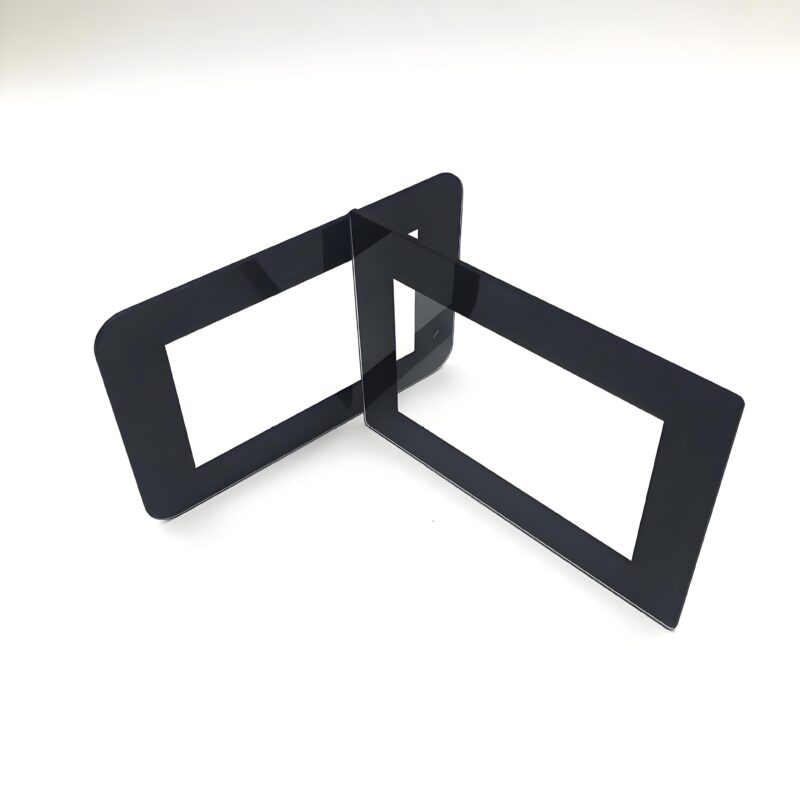
8. Black Border Printing and Functional Graphics
Many POS terminals use a printed border around the active display area.
Black silk-screen printing can hide:
- Display edges
- Touch sensor traces
- Adhesive areas
- Internal components
- Mechanical structures
Custom printing can also include:
- Logos
- Symbols
- Buttons
- Product identification
- Functional markings
For OEM production, the printing design should be defined together with the glass dimensions and display active area.
Important specifications may include:
- Print color
- Print area
- Line width
- Logo dimensions
- Printing tolerance
- Ink durability
- Surface position
Screen printing should also be tested for resistance to repeated cleaning and handling.
9. CNC Machining and Custom Geometry
POS terminal cover glass is rarely just a simple rectangular piece.
Depending on the product design, the glass may require:
- Rounded corners
- Custom corner radii
- Holes
- Slots
- Notches
- Cut-outs
- Special outer profiles
- Polished or chamfered edges
CNC machining allows the glass geometry to be customized according to the terminal enclosure and internal components.
Edge quality is particularly important because poorly processed edges can become areas of stress concentration.
OEM drawings should clearly define dimensions, tolerances, corner radii, holes, cut-outs, and edge specifications before production.
10. OCA and Optical Bonding
The cover glass is part of the complete display stack.
A typical touchscreen structure may include:
Cover Glass → OCA → Touch Sensor → Display
Optical bonding can improve the integration between the cover glass and display module.
Potential benefits include:
- Reduced internal reflection
- Improved display readability
- Reduced parallax
- Better visual appearance
- Improved touch-display integration
However, optical bonding also introduces additional manufacturing requirements, including adhesive selection, cleanliness, bond-line control, curing, and inspection.
Therefore, the cover glass specification should be developed together with the bonding process.
11. Cleaning and Chemical Resistance
POS terminals are frequently handled by different users and may require regular cleaning.
The cover glass and surface coating should therefore be evaluated for resistance to the cleaning chemicals used by the terminal operator.
Important considerations include:
- Alcohol-based cleaning
- Repeated wiping
- Detergents
- Finger oils
- Surface coating durability
- Printing durability
Testing should be performed using the actual cleaning procedure expected during the product’s service life.
12. What Should Be Included in a POS Cover Glass RFQ?
When requesting an OEM quotation, providing complete technical information helps the manufacturer recommend the correct solution.
A typical RFQ should include:
Specification Example Application POS terminal Glass material Soda-lime / Aluminosilicate Thickness 1.1 / 1.5 / 2.0 mm Strengthening Chemical / Thermal Size Custom Shape Custom Corner radius Custom Holes / cut-outs Required if applicable Edge processing Polished / Chamfered Surface treatment AG / AR / AF Printing Black border / Logo Touch technology PCAP Bonding OCA / Optical bonding Quantity Prototype / Mass production Quality requirements Custom inspection standard A technical drawing is especially useful for custom POS terminal cover glass because it allows the manufacturer to review dimensions, tolerances, openings, printing, and edge requirements before quoting.
POS Terminal Cover Glass Design Checklist
Before approving a design, confirm:
-
Glass material
-
Glass thickness
-
Strengthening method
-
Touch technology
-
Touch sensitivity
-
AG / AR / AF treatment
-
Optical requirements
-
Black border printing
-
Logo or functional graphics
-
CNC machining
-
Edge processing
-
Holes and cut-outs
-
OCA or optical bonding
-
Cleaning requirements
-
Chemical resistance
-
Prototype testing
-
Final inspection requirements
Conclusion
Selecting POS terminal glass requires balancing mechanical protection, touch sensitivity, optical performance, surface durability, appearance, and manufacturing requirements.
The best specification is not necessarily the thickest or strongest glass. It should be optimized for the complete POS terminal, including the display, touch sensor, enclosure, bonding method, surface treatment, and expected operating environment.
For OEM projects, a custom cover glass manufacturer can help optimize the combination of glass material, thickness, strengthening, CNC machining, AG/AR/AF coating, silk-screen printing, and bonding.
Need Custom POS Terminal Cover Glass?
WM Cover Glass provides custom cover glass solutions for POS terminals and other electronic displays. Options include custom dimensions, chemical strengthening, thermal tempering, CNC machining, AG/AR/AF coatings, silk-screen printing, and bonding solutions.