 +86-13925515590
 kleinma@aliyun.com

Black Border Printing on Custom Cover Glass: Design and Manufacturing Considerations

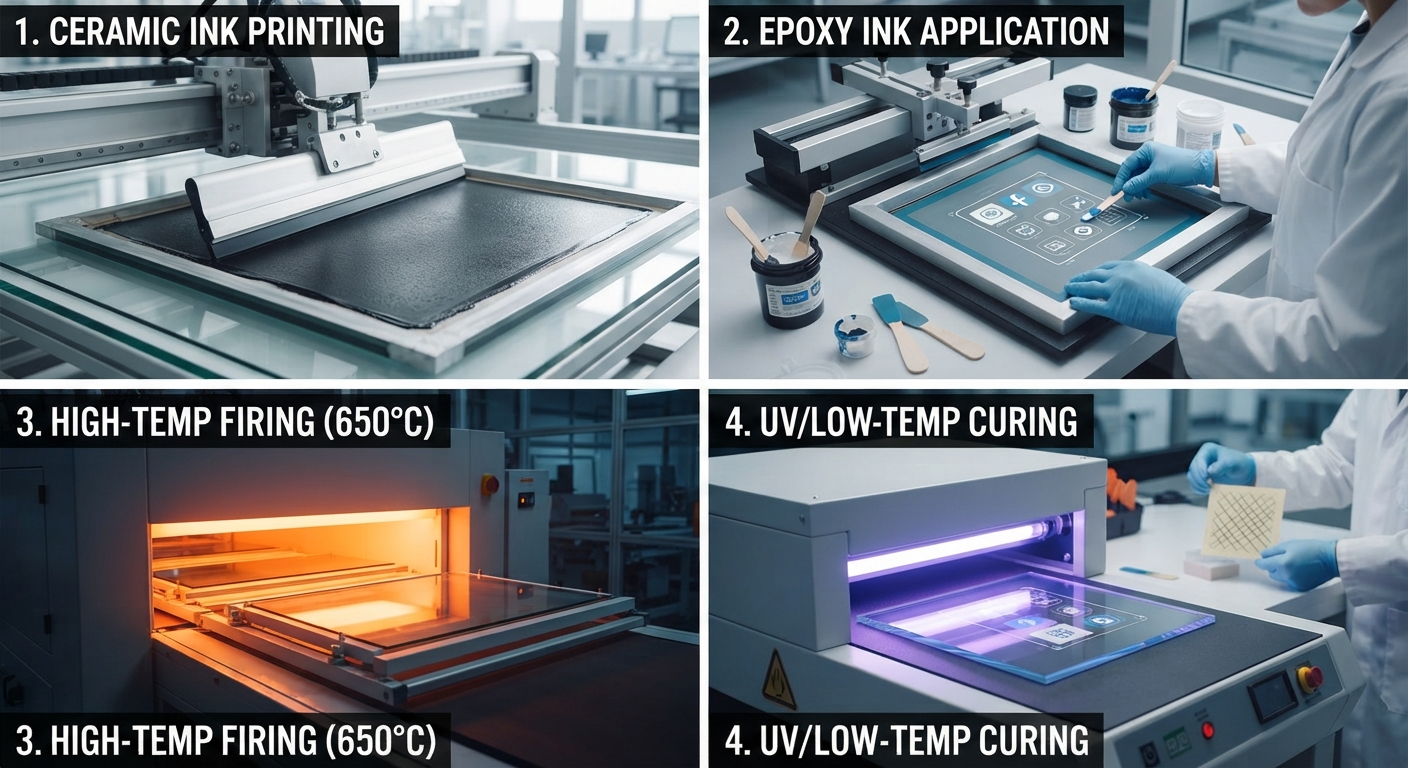
Glass Screen Printing Black Border on Custom Cover Glass
A black border on cover glass may look like a simple decorative feature, but it serves several important functions in electronic products. It can conceal adhesive areas, mask display edges, cover internal components and create a consistent appearance between the glass panel and the product housing.
For OEM display manufacturers, the challenge is making sure that the printed border looks right while maintaining the required viewing area, sensor openings and assembly dimensions.
A small printing deviation can become noticeable when the glass is installed in a finished product. An uneven border, partially covered viewing window or visible pinholes may affect the appearance of an otherwise well-manufactured display assembly.
This is why black border printing should be considered during the cover glass design stage rather than treated as a final decorative operation.
This guide explains how to specify black printing on custom cover glass, including ink selection, print-side orientation, border dimensions, transparent windows, adhesion and production inspection.
1. Why Is Black Border Printing Used on Cover Glass?
Black silk-screen printing is commonly used on electronic cover glass to separate the visible display area from the surrounding mechanical structure.
Depending on the product design, the printed area may serve several purposes.
Concealing internal components
The black border can hide adhesive layers, display module edges, sensor structures and other components that should not be visible during normal operation.
Defining the viewing area
The printed opening determines which part of the display remains visible. Its dimensions must match the actual active display area and the mechanical assembly.
Creating a consistent appearance
A uniform black border gives the finished product a cleaner appearance and helps maintain visual consistency across different panel sizes.
Supporting product graphics
Logos, icons, indicator windows and control markings can be integrated into the printed design.
Typical applications include:
- Industrial HMI and touchscreen panels.
- Electronic control panels.
- Household appliance displays.
- Automotive display interfaces.
- Consumer electronics.
- Smart equipment and control terminals.
The printing specification should reflect the function of each printed area. An opaque decorative border, a logo and a transparent sensor window should not automatically share the same ink or optical requirements.
2. Choosing the Right Printing Side
One of the first decisions is whether the black border should be printed on the front or rear surface of the glass.
For many electronic cover glass applications, second-surface printing is preferred.
In this arrangement, the ink is applied to the rear face of the glass, while users view the graphics through the unprinted front surface.
This construction can protect the printed layer from direct contact, routine cleaning and surface abrasion during normal use.
However, the correct printing side depends on the complete product construction.
Consider the following factors:
- Whether the glass is viewed from one side or both sides.
- Whether the printed surface will contact adhesive.
- Whether optical bonding is required.
- Whether the glass has AG, AR or AF surface treatments.
- Whether the printing process takes place before or after strengthening.
The drawing should clearly identify the viewing face and printing face. Terms such as front side and back side can be confusing if the engineering drawing does not define the viewing direction.
For double-sided printing or products with multiple optical windows, each printed layer should be identified separately.
3. Black Border Width and Viewing Window Design
Border width is not simply an aesthetic measurement. It is related to the display dimensions, mechanical enclosure and assembly tolerance.
A border that is too narrow may expose the display edge, adhesive or internal components. A border that is too wide may reduce the usable viewing area.
Before approving the artwork, engineers should compare three dimensions:
Glass outside dimensions
These define the physical size of the cover glass and its relationship with the housing.
Printed border dimensions
These define the area covered by black ink, including the width of each side and the shape of the corners.
Active display area
This defines the portion of the screen that must remain visible after the glass is installed.
These dimensions should be checked together rather than reviewed independently.
For example, a touchscreen assembly may have an active display area that is slightly smaller than the visible glass window. The design must account for this difference and ensure that the printed border does not interfere with the required display content.
A useful drawing should identify the viewing window using explicit coordinates or dimensions from a common datum.
Avoid specifying border width only through a visual reference image. A dimensioned drawing and controlled artwork file provide a more reliable basis for production.
4. Transparent Windows, Camera Openings and Sensor Areas
Some cover glass designs require transparent areas within an otherwise black printed border.
These areas may be used for:
- Camera lenses.
- Infrared sensors.
- Light sensors.
- Indicator LEDs.
- Optical detection components.
- Display status windows.
An important distinction must be made between a physical glass opening and an unprinted transparent window.
A physical opening removes glass material through machining.
A transparent printing window retains the glass but leaves a specified area without opaque ink.
The difference affects both the engineering drawing and manufacturing process.
For a transparent window, the drawing should define:
- Window dimensions.
- Position relative to the glass datum.
- Corner radius, if applicable.
- Required optical transmission or appearance.
- Printing registration tolerance.
- Whether the window must remain completely free of ink.
For example, an infrared sensor window may require a specific transmission range at the sensor’s operating wavelength. A visually transparent area is not necessarily suitable for infrared transmission.
Likewise, a camera opening should be evaluated against the camera’s field of view, lens position and surrounding optical structure.
Do not assume that every transparent window has the same optical requirements.
5. Selecting Black Ink for Glass Screen Printing
Ink selection has a direct influence on appearance, adhesion and long-term performance.
The two broad categories commonly considered for glass printing are ceramic inks and organic ink systems.
Ceramic ink
Ceramic ink contains inorganic components that can fuse with the glass during a suitable high-temperature firing process.
It is often considered when the product requires durable decorative printing and the glass manufacturing route allows the required thermal treatment.
However, the printing and strengthening sequence must be reviewed carefully.
The glass, ink and firing cycle must be compatible. Not every glass type, thickness or strengthening process is suitable for every ceramic ink system.
Organic ink
Organic glass inks may use UV curing, thermal curing or two-component chemical curing, depending on the formulation.
They can be useful when the glass has already been strengthened or when a high-temperature firing process is not appropriate.
Their suitability depends on the ink manufacturer’s technical specifications and the actual service environment.
Relevant factors include:
- Adhesion to the specified glass surface.
- Resistance to cleaning chemicals.
- Abrasion resistance.
- Temperature exposure.
- UV exposure, where applicable.
- Compatibility with subsequent adhesive bonding.
There is no universally best black ink for every cover glass project.
The correct choice should be based on the glass substrate, processing sequence, final application and agreed performance requirements.
For technical reference, see Marabu’s Mara Glass MGL Technical Data Sheet, which explains substrate preparation, surface cleanliness and preliminary adhesion trials for its specific ink system.
6. Surface Preparation and Ink Adhesion
A black border may initially look uniform but still fail during subsequent handling or use if the ink does not adhere properly.
Glass surfaces require particular attention because contamination can interfere with the printing process.
Common sources of contamination include:
- Fingerprints and skin oils.
- Dust and loose particles.
- Silicone residues.
- Processing lubricants.
- Cleaning-agent residues.
- Contamination introduced during handling.
Before printing, the glass should undergo a suitable cleaning and drying process.
The exact cleaning procedure depends on the glass material, coating condition and ink manufacturer’s recommendations.
If the glass has an AG, AR or AF coating, compatibility should be evaluated before printing. Printing over a functional coating may require a different process or a specifically qualified ink system.
Surface treatment and printing sequence should therefore be confirmed during engineering review.
For new projects, preliminary samples should be used to evaluate ink adhesion on the actual production glass rather than relying solely on tests performed on a different substrate.
7. Printing Registration and Border Uniformity
Printing registration is one of the most important quality considerations for black border cover glass.
The artwork must align with the glass outline, viewing window, openings and other functional features.
Several issues may occur when printing registration is not properly controlled.
Uneven border width
The black border may appear wider on one side than the other, especially when viewed against the display module.
Misaligned transparent windows
The printed opening may not match the position of the camera, sensor or active display area.
Ink encroachment
Ink may extend into an area that should remain transparent.
Incomplete coverage
Small unprinted areas may expose internal components or adhesive.
Corner defects
Ink accumulation or irregular printing near rounded corners can create visible differences in appearance.
A production drawing should identify the critical registration dimensions and distinguish them from non-critical decorative details.
The acceptance tolerance should be agreed with the manufacturer based on the part geometry, printing equipment, glass dimensions and assembly requirements.
Do not assume that one universal registration tolerance applies to all glass sizes and printing designs.
8. Common Black Border Printing Defects and How to Prevent Them
The following table summarizes common defects and the manufacturing checks that can help reduce their occurrence.
| Potential defect | Possible cause | Recommended control |
|---|---|---|
| Pinholes | Contamination or uneven ink transfer | Surface cleaning and print inspection |
| Uneven border | Artwork or screen misalignment | Registration checks |
| Ink peeling | Poor adhesion or unsuitable curing | Ink compatibility and adhesion testing |
| Color variation | Ink batch or curing differences | Approved reference sample and process control |
| Blurred edges | Screen condition or excessive ink spread | Screen and printing parameter checks |
| Blocked window | Incorrect artwork or registration | Transparent-area inspection |
| Scratches | Improper handling or packaging | Protective separation and handling controls |
| Incomplete coverage | Insufficient ink deposition | Coverage and opacity inspection |
Not every defect has the same acceptance criteria.
For example, a small cosmetic mark in a concealed area may have a different significance from a pinhole in a visible black border.
It is therefore useful to divide the glass into functional inspection zones:
- Visible decorative border.
- Transparent viewing window.
- Sensor and camera areas.
- Concealed assembly areas.
- External edges.
The inspection plan should identify which defects are acceptable, which require rework and which result in rejection.
9. How to Inspect Printed Cover Glass Before Assembly
Visual inspection is important, but it should not be the only quality control method.
A suitable inspection plan may include several checks.
Appearance inspection
Check black border uniformity, pinholes, scratches, ink contamination, incomplete coverage and visible printing defects.
Dimensional inspection
Measure the finished glass dimensions, printed border width and the location of important openings.
Registration inspection
Compare the printed pattern with the approved artwork and engineering drawing.
Adhesion testing
Use a test method appropriate to the selected ink system and application.
Durability testing
Where required, evaluate resistance to abrasion, cleaning chemicals, humidity, temperature and other actual service conditions.
The test method, conditioning, acceptance criteria and sampling frequency should be agreed before production.
For general background on screen printing processes and design considerations for flat glass, refer to the National Glass Association’s General Guidelines for Screen Printing on Flat Glass.
The document discusses variables such as screen mesh, ink transfer and printing quality. Its recommendations should be evaluated against the specific cover glass application.
10. What Should OEM Buyers Provide When Requesting Printed Cover Glass?
A complete RFQ helps the manufacturer understand the design and evaluate the printing process before preparing samples.
For black border printing projects, buyers should ideally provide:
| Information | Details required |
|---|---|
| Glass material | Soda-lime, aluminosilicate or other specified material |
| Glass thickness | Nominal thickness and tolerance |
| Overall dimensions | Finished length, width and profile |
| Printing side | First-surface or second-surface printing |
| Ink requirement | Ceramic, UV-curable or other approved system |
| Border design | Width, shape and color reference |
| Transparent windows | Dimensions and positions |
| Openings | Physical holes, cutouts and sensor locations |
| Surface treatment | AG, AR, AF or untreated glass |
| Strengthening | Chemical or thermal strengthening |
| Inspection | Appearance, registration and adhesion requirements |
| Quantity | Prototype and estimated production volume |
A dimensioned PDF or CAD drawing should be supplied together with the final-scale vector artwork.
If the artwork is still under development, identify the areas that are fixed and those that remain open to engineering review.
This allows the glass manufacturer to identify potential conflicts between printing, machining, strengthening and final assembly before sample production.
11. Working with a Custom Cover Glass Manufacturer
A reliable manufacturing review should consider the complete glass component rather than treating black printing as an isolated process.
For example, an industrial touchscreen cover may require CNC machining, chemical strengthening, AG surface treatment and black silk-screen printing.
The order of these processes matters. The ink system must be compatible with the glass surface and the selected manufacturing sequence.
At Weiman, custom cover glass projects can be evaluated according to the supplied drawings, glass specifications, surface treatment requirements and intended application.
You can explore our custom cover glass solutions and manufacturing capabilities for more information.
If your project includes black borders, logos, sensor windows or other printed graphics, send the engineering drawing and artwork through our RFQ page.
Conclusion
Black border printing is an important part of custom cover glass design because it affects both the finished appearance and the functional relationship between the glass and display assembly.
The key considerations include print-side selection, border dimensions, transparent windows, ink compatibility, surface preparation, registration and inspection.
A properly defined printing specification gives the manufacturer a clearer basis for process selection and quality control.
For OEM buyers, reviewing these details before sample production can help reduce design changes and avoid unnecessary delays during assembly.
Planning an electronic display or touchscreen project with black printed borders? Send Weiman your glass drawing and artwork for a manufacturing review.